


Audit Log
Track organizational security events with nRouter audit logs. Inspect detailed user actions, key changes, and permission edits, and export the trail to CSV.
The nRouter Audit Log (/audit) provides an immutable, append-only security and compliance trail recording all administrative changes, virtual key lifecycle events, member actions, and security policy modifications across your organization. Designed for SOC 2 Type II reviews and internal governance audits, every consequential configuration event captures who made the change, what was updated, and the exact timestamp.
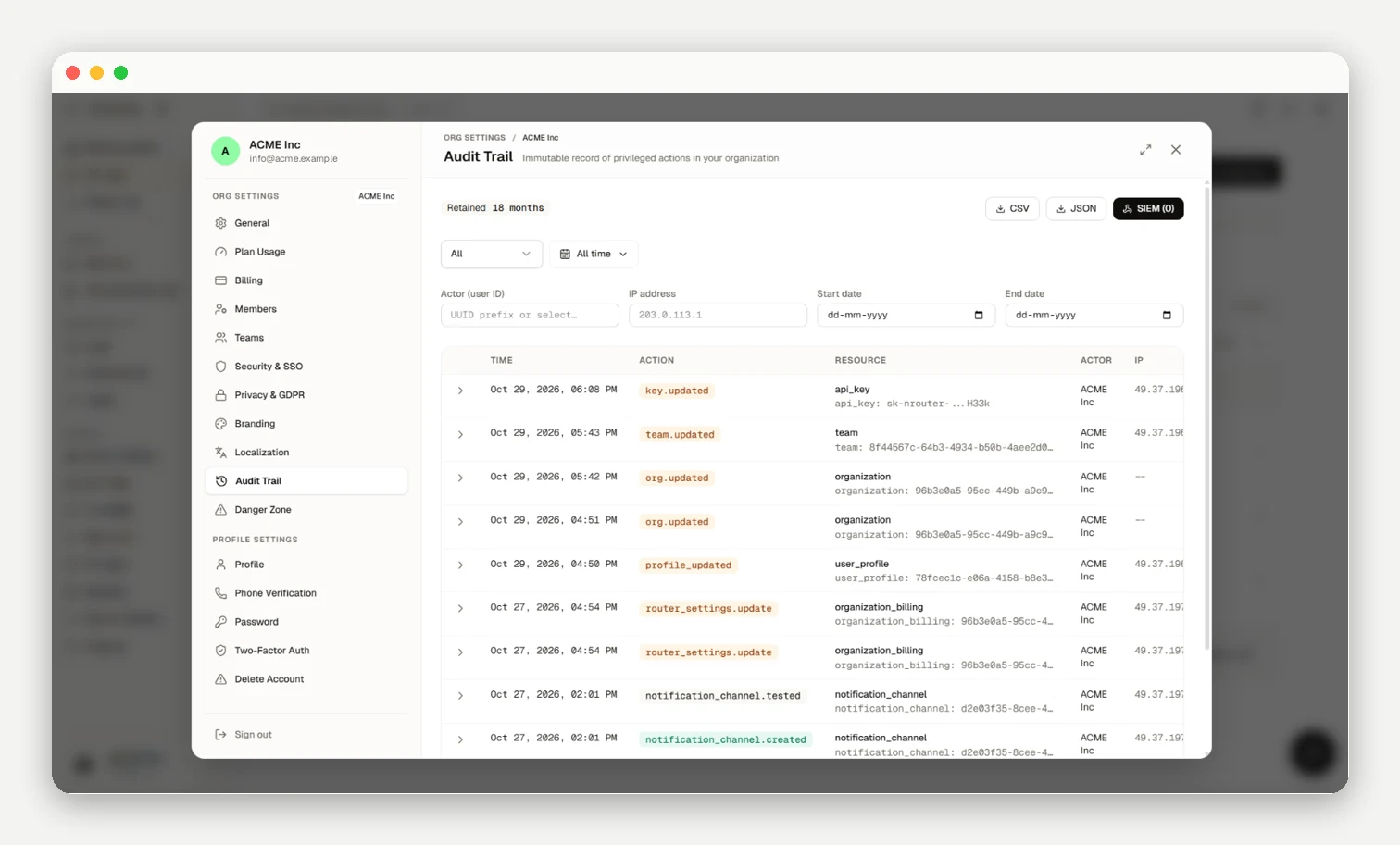
Audited Events & Structure
The audit log captures state-changing events with UTC timestamps, actors, resources, and field-level diffs:
- API Keys & Members: Key lifecycle, invites, acceptances, and role changes (Owner, Org Admin, Member).
- Teams & Organization: Team creation/edits, org deletion, and account metadata.
- Budgets & Guardrails: Spend thresholds, durations, and safety rule modifications.
- Settings & Profile: Router policies, fallbacks, data policies, profile edits, and password resets.
Inference Boundary: The audit log tracks governance actions only; model inference prompts and completions are never recorded (see Data Policy Settings).
Governance Policies
- Access & Retention: Scoped to Owners and Org Admins; retained for 18 months to satisfy SOC 2 Type II audits.
- Immutability & Export: Append-only (records cannot be modified or deleted); export filtered trails to CSV or JSON. External SIEM forwarding configurations can be saved but are not actively dispatched today.
Next steps
Frequently asked questions
Who in my organization can view the audit log?
Access is restricted to organization Owners and Org Admins; members and viewers cannot view or export audit records.
What actions actually get recorded?
State-changing governance actions across keys, members, teams, budgets, guardrails, routing policies, and account settings are recorded.
Can I see exactly what changed in an event?
Yes, each entry includes a field-level before/after diff highlighting modified values alongside actor metadata.
Can I edit or delete entries to clean up the trail?
No, the audit trail is strictly append-only and records cannot be modified or deleted.
How long are audit events retained?
Events are retained for 18 months and purged automatically to cover SOC 2 Type II compliance windows.
Can I export the audit trail?
Yes, Owners and Org Admins can export filtered views to CSV or JSON for compliance reviews.
How do I narrow the log down to what I'm looking for?
Filter by action category (Keys, Members, Budgets, Guardrails, Settings) and specify calendar date ranges.
Can I stream audit events into my SIEM?
Not yet; external SIEM streaming is not active today, so use CSV or JSON export to ingest records.
Does the audit log affect my bill, budgets, or rate limits?
No, audit logging is included across all plans without consuming credits or rate-limit slots.
Does the audit log capture the prompts and responses of my LLM calls?
No, inference payloads are never recorded; see data policy settings for request logging policies.