


Team Management
Invite team members, assign role-based access permissions, and manage granular user privileges across workspaces and departments in your nRouter organization.
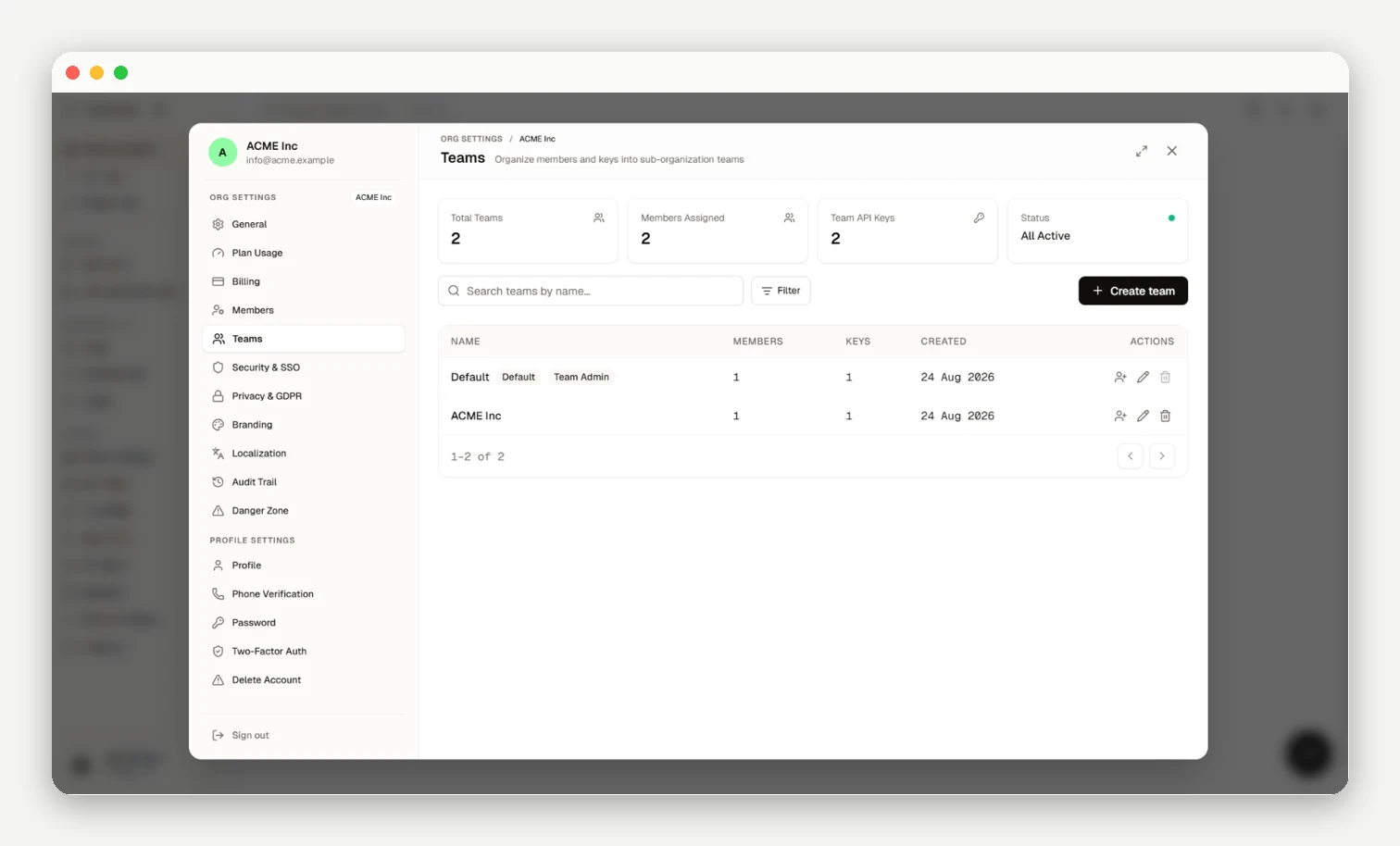
nRouter enforces multi-tenant role-based access control (RBAC) across four core organization roles—Owner, Org Admin, Member, and Viewer—alongside team-scoped Team Admin administrative authority, with granular team-level resource isolation. Team workspaces allow organizations to partition API keys, spending budgets, and rate limits by department or project.
Organization Roles
| Role | Dashboard Access | Create Keys | Manage Team | Manage Billing | Delete Org |
|---|---|---|---|---|---|
Viewer | Read-only analytics and logs | No | No | No | No |
Member | Full workspace access | Yes (own keys) | No | No | No |
Org Admin | Full workspace access | Yes (all keys) | Yes | View only | No |
Owner | Full administrative control | Yes (all keys) | Yes | Yes | Yes |
Owner: Exclusive authority over member roles, payment methods, and deletion (last-owner guard enforced).Org Admin: Manages members, team budgets, guardrails, and keys; cannot modify billing methods or delete the workspace.Member: Creates personal virtual keys and views own activity logs.Viewer: Read-only access to analytics, audit logs, and traces.
Team Admin Workspace Authority
Within a specific team workspace, an organization member can be assigned the Team Admin role. Team Admins possess administrative control over their designated team:
- Creating, editing, and deleting team virtual keys.
- Setting per-key
RPMandTPMrate limit ceilings for keys within their team. - Managing member assignments within their team.
- Isolation Boundary: Team Admins cannot view or modify keys belonging to other teams, unassigned organization members, or Owner and Org Admin keys. They cannot alter organization billing, SSO, or organization-wide security policies.
Inviting Members
Invite members under People → Members (/[organization]/people/members). Owners invite Viewers, Members, or Org Admins; Org Admins invite Viewers and Members. Invites remain valid for 7 days.
Creating Teams
Partition department resources at People → Teams (/[organization]/people/teams):
| Resource | Scoping Behavior |
|---|---|
| API Keys | Virtual keys scoped to a team are restricted to team member visibility and management |
| Budgets | Dedicated spending limits per team; exhaustion returns HTTP 402 with x-nr-limit-source: budget |
| Rate Limits | Per-key RPM and TPM ceilings for all keys in the team (Effective Limit = min(Key Limit, Team Limit), inside organization plan limits). Clamps individual keys rather than pooling team consumption |
| Usage Analytics | Filters spend, token consumption, and request metrics by team |
| Guardrails | Enforces safety policy resolution via hierarchical precedence: key > team > org |
Member Lifecycle
Only Owners modify roles. Members belong to at most one team at a time. Removing a member revokes dashboard access immediately, while their API keys remain active organization assets until deleted on /keys. Contact support@nrouter.ai for ownership transfers.
Frequently asked questions
What happens to a removed member's API keys?
Removing a member revokes dashboard access immediately, but their API keys remain active organization assets until manually revoked.
How do team budgets and rate limits interact with my billing and credits?
Team budgets prevent individual teams from exhausting credits (HTTP 402 budget_exceeded), while team RPM/TPM sets per-key ceilings; see Budget Controls.
Can I transfer ownership of my organization to another member myself?
Contact support@nrouter.ai to transfer ownership under last-owner protection rules.
Next Steps
- Organization Setup — Configure your organization settings
- Budget Controls — Set spending limits per team or key
- Authentication — API key management