


Budget Controls
Configure hierarchical spending limits, hard spend caps, and token rate controls to prevent budget overages across organizations, teams, and virtual keys.
nRouter enforces multi-tier spending budgets and throughput rate limits across organizations, teams, users, and virtual keys to prevent runaway costs and guarantee strict spend containment. Spending budgets cap cumulative dollar spend (USD), while rate limits regulate request velocity. Both controls are evaluated during gateway pre-flight, rejecting requests before reaching upstream providers if breached.
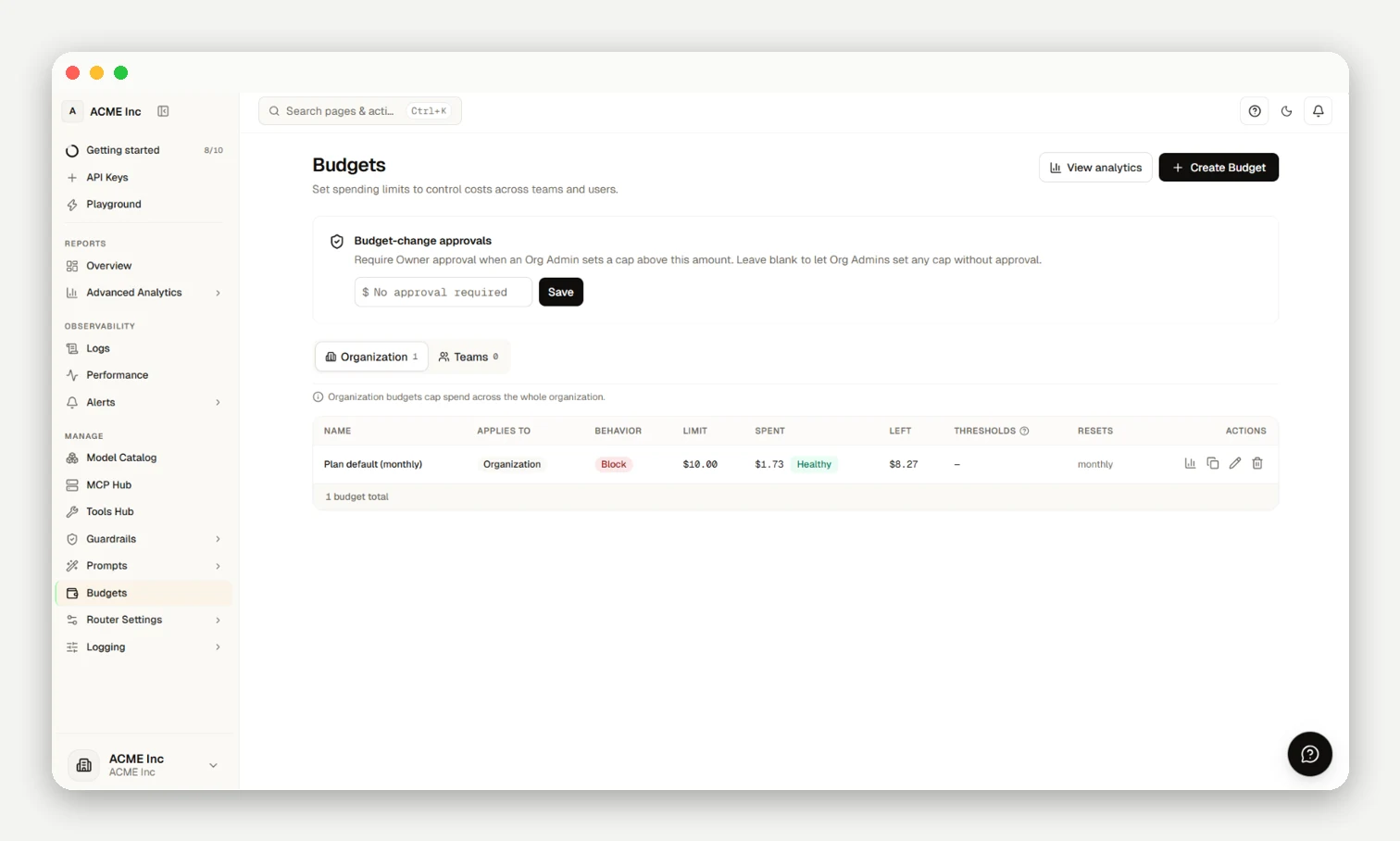
Spending Budgets
Spending budgets cap the maximum dollar amount an entity can consume, tracking exact provider list price with a 0% platform fee.
Budget Scope & Hierarchy
The tightest applicable budget binds first:
| Scope | Target | Authorization |
|---|---|---|
| Organization | Total account spend across all keys and teams | Owner / Org Admin |
| Team | Aggregate spend across all virtual keys in a team | Owner / Org Admin |
| User | Total spend across all keys created by a specific user | Owner / Org Admin |
| API Key | Dedicated spend cap for a specific service or environment key | Key Creator / Admin |
Budget Durations
| Duration | Reset Schedule | Best For |
|---|---|---|
| Daily | Midnight UTC daily | Dev & test |
| Weekly | Midnight UTC Mondays | CI & sprints |
| Monthly | 1st of month UTC | Production |
| Total | Never resets | POCs & fixed grants |
Enforcement Modes & Error Headers
| Mode | Behavior at Cap | Headers & Response Codes |
|---|---|---|
| Block | Rejected at pre-flight when spend + hold exceeds max_budget. | Returns HTTP 402 budget_exceeded with x-nr-limit-source: budget. |
| Warn | Requests continue; notifications trigger at thresholds. | A soft budget returns an x-nr-budget-warning header when crossed. |
| Throttle | Flags throughput rate reduction without hard rejection. | Emits warning alerts and lowers effective RPM/TPM ceilings. |
HTTP 402 vs HTTP 429: Spending budget exhaustion returns HTTP 402
budget_exceededwithx-nr-limit-source: budget. HTTP 429rate_limit_exceededis reserved strictly for throughput rate limits and subscription allowance windows. Successful requests return exact charges inx-nr-request-cost.
Rate Limits
Rate limits control throughput over sliding windows:
- Metrics: RPM (Requests Per Minute), TPM (Tokens Per Minute), Requests per second (RPS), and RPD (Requests Per Day).
- Resolution: Effective limit is
min(Key Limit, Team Limit, Plan Ceiling). - Exceeded behavior: Returns HTTP 429
rate_limit_exceededwithRetry-Afterandx-nr-limit-source. See Errors & Rate Limits for retry guidance.
Credits vs Budgets
| Concept | Purpose | Mechanics |
|---|---|---|
| Credits | Payment balance | Prepaid balance purchased at 0% fee; settles at list price. |
| Budgets | Governance limits | Spending boundaries per scope without locking funds. |
Monitoring & Analytics
Track allocations under Budgets (/[org]/budgets), live meters in Advanced Analytics, and request outcomes in Request Logs (Reports → Observability).
No historical block count
Because budget blocks occur during pre-flight before provider execution, blocked calls incur $0 cost and write no spend logs. The dashboard reflects budgets actively blocking now. Detailed rejection events are visible in Request Logs under Reports → Observability.
Frequently asked questions
Who is allowed to create and edit budgets?
Owners and Org Admins configure org, team, and user budgets; members can set caps on their own keys at creation.
What's the difference between a budget and my credit balance?
Credits are prepaid account funds; budgets are policy limits restricting credit draw without locking funds.
What happens when a budget is hit, and which error do I get?
Exhaustion returns HTTP 402 budget_exceeded (x-nr-limit-source: budget); HTTP 429 is reserved for throughput limits (RPM, TPM, requests per second (RPS), and RPD) and allowances.
Can I get warned before a budget starts blocking requests?
Yes, a soft budget returns an x-nr-budget-warning header when crossed to alert your app before hard blocking.
Do I have to hard-block requests at the cap, or can I just get alerted?
Block returns HTTP 402, while Warn or Throttle fires threshold notifications without cutting traffic.
What scopes can I set a budget at, and can they stack?
Budgets stack across org, team, user, and key scopes, with the tightest limit binding first.
Do budgets reset automatically?
Daily, Weekly, and Monthly budgets reset at midnight UTC on schedule; Total budgets never reset.
How are rate limits different from budgets, and what sets them?
Budgets cap dollar spend, while rate limits cap throughput velocity (RPM/TPM) to min(Key Limit, Team Limit, Plan Ceiling).
How should my application handle a rate-limit response?
Back off for the duration in the Retry-After header returned on 429 Too Many Requests; see Errors & Rate Limits.
Where do I see current spend and find out what's blocking requests right now?
View active meters on /budgets or the Advanced Analytics live panel, and inspect blocked calls in Request Logs.
Next Steps
- Organization Setup — Configure your organization
- Team Management — Create teams and assign budgets
- Authentication — Create and manage API keys