


Model Catalog
Browse, filter, and compare all LLM models and multimodal providers available to your organization, including capabilities, list pricing, and health status.
The Models catalog (/models) provides a unified, searchable directory of every LLM and multimodal model available to your organization across all supported provider clouds. Every model is reachable through a single API endpoint with your virtual key, settles at exact provider list price with zero per-token markup, and reflects live availability from the live Models API.
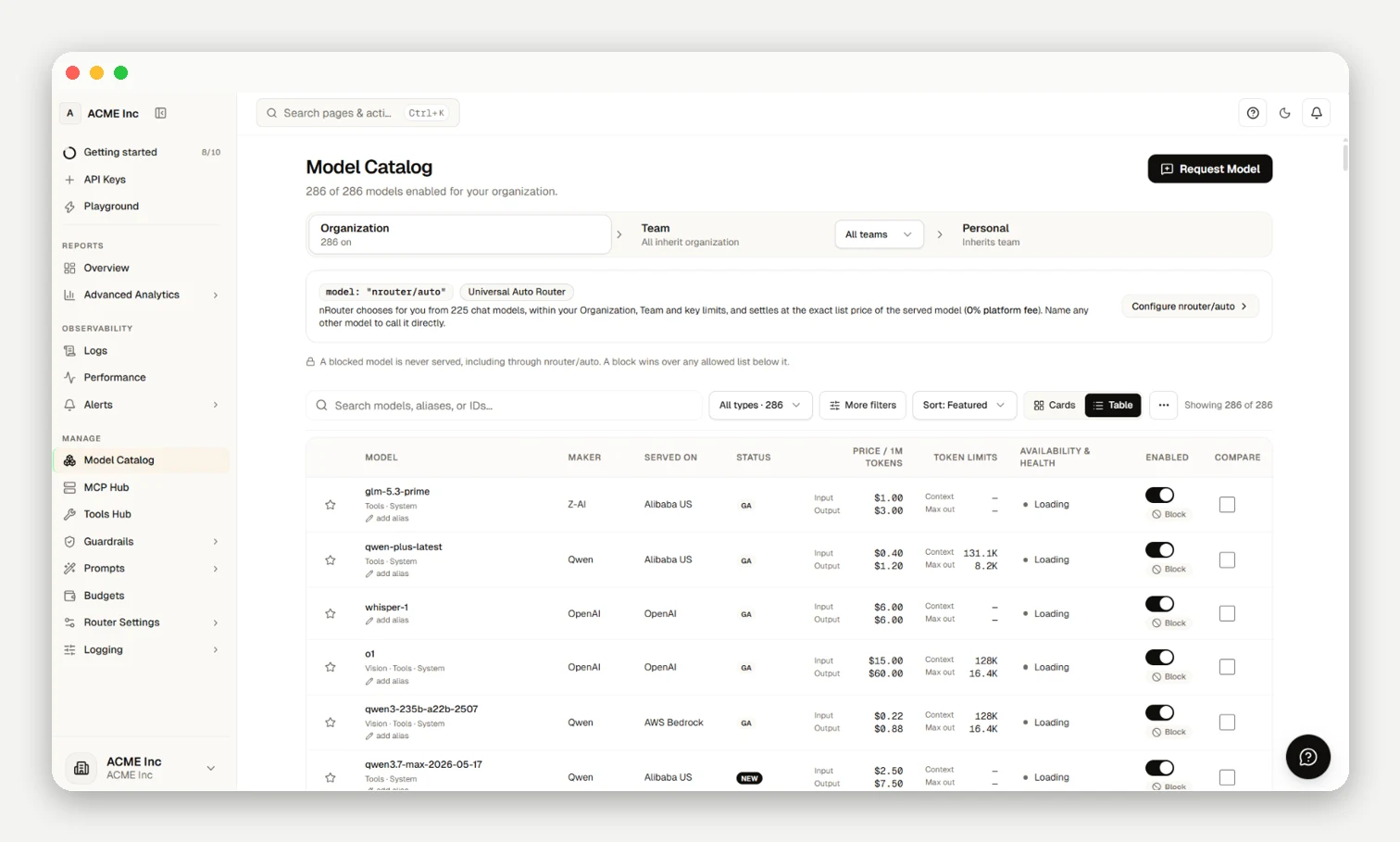
nrouter/auto & Access Scopes
- Auto Routing: Passing
"model": "nrouter/auto"routes across all enabled chat models permitted by your organization, settling at exact list price with 0% platform fee. - Scope Hierarchy: Organization (master allowlist) ▸ Team (team allowlist) ▸ Personal (virtual key limits). Sub-scopes can only narrow available models.
- Search & Filters: Filter by provider, modality (chat, embedding, vision, audio, video), or status. Compare specs or pin starred models.
- Restrictions: Restricted models return explicit errors rather than silently routing elsewhere.
Model RBAC & Deny-Always-Wins
nRouter supports fine-grained Model RBAC configured at Organization, Team, or Virtual Key scope. Both model allowlists (models) and explicit model deny lists (denied_models) are enforced:
- Deny Always Wins: If a model matches a
denied_modelsrule at key, team, or organization scope, access is immediately blocked with HTTP 403 (key_model_not_allowedormodel_denied_by_*) regardless of allowlists, wildcard grants, or model alias rewrites. - Hierarchical Narrowing: Sub-scopes can only restrict access further; a team or key can never allow a model that is denied or omitted by an enclosing organization policy.
Next steps
- Meta Llama Guide — Llama 3.3, 405B, and Llama 4 Scout
- TypeSafe Jev Guide —
typesafe/jev: sub-100ms System One routing - Analytics & Reports — Live benchmark reports from real traffic
- Provider Clouds — What runs on each provider cloud
Frequently asked questions
Which models can I call today, and does browsing the catalog cost anything?
Browse all available models for free; you only pay when making API calls, settled at exact provider list price.
Do I need a separate key or endpoint for each provider?
No; your single sk-nrouter-* virtual key calls every provider through standard API endpoints.
What is a model alias and how do I use it?
Aliases are friendly names you can pass in the model field in place of full provider IDs.
Who can restrict which models my organization is allowed to call?
Organization Owners and Org Admins configure organization-wide model allowlists and deny lists (denied_models). Deny rules take precedence across all scopes: if a model is listed under denied_models at the organization, team, or key level, it is blocked. Sub-scopes can only further restrict access, and a key cannot override an organization-level deny rule.
What happens if I call a model that's been restricted or locked to a higher tier?
The gateway rejects the request with an explicit error rather than silently routing elsewhere.
Can I pin the models my team uses most?
Yes; star any model in the catalog to pin it to the top of your view.
Can I request a model that isn't in the catalog, and who's allowed to?
Any signed-in member can submit a request via Request Model; requests are reviewed within 24 hours.
Can I bring my own fine-tuned model?
Yes; pass your fine-tuned provider model ID directly in the model field.